
Sender: GetProofed, a product of Citinet Solutions, LLC · 108 Village Square, Suite 189, Somers, NY 10589 · support@getproofed.ai · texts come from our toll-free number +1 877-663-4336.
1. How someone opts in to project update texts
GetProofed is a job-photo app for contractors and homeowners (getproofed.ai/app). Texts are off by default. A signed-in user turns them on themselves:
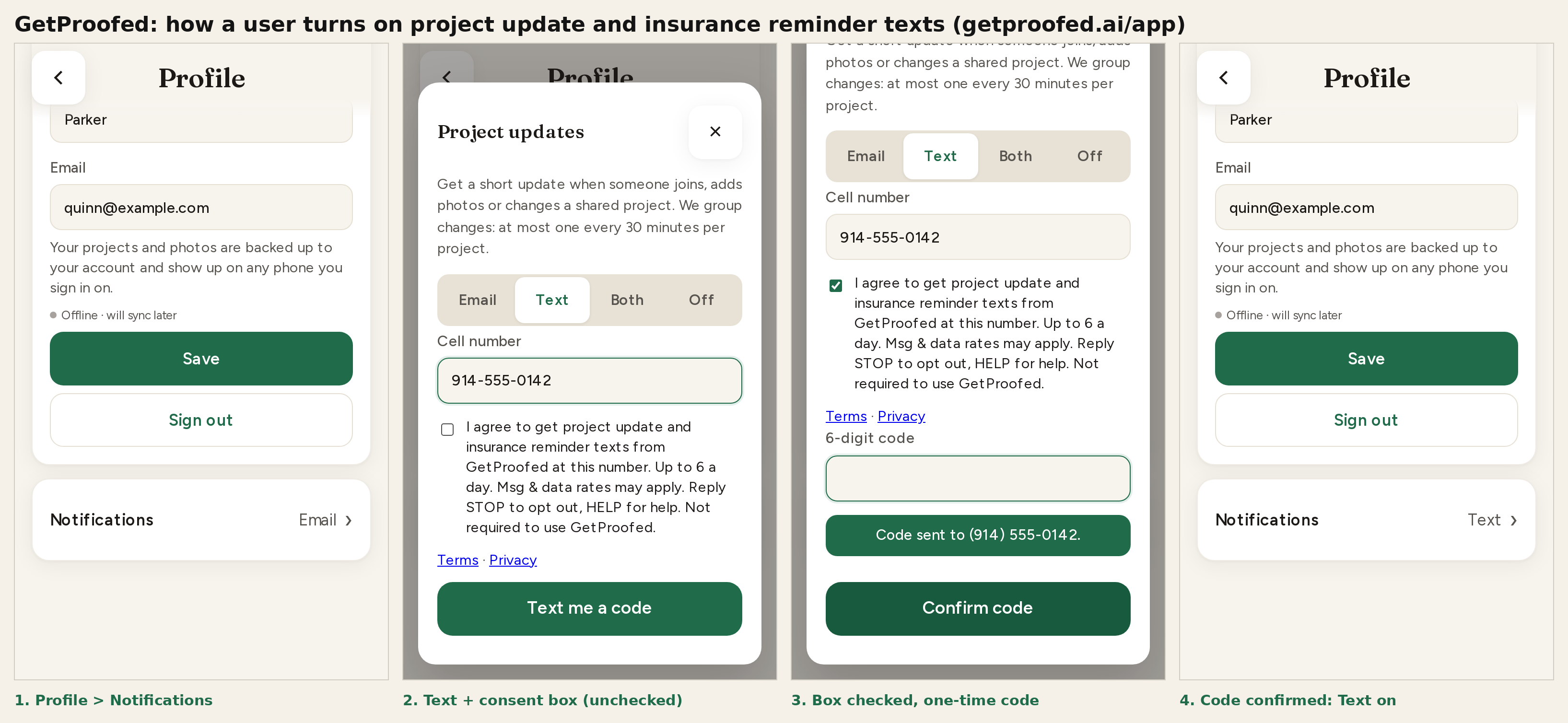
- Open Profile and tap Notifications.
- Choose Text (or Both) and enter their own cell number.
- Check the consent box. It is unchecked by default, links to our Terms and Privacy Notice right below it, and texting cannot start without it. It reads exactly:
“I agree to get project update and insurance reminder texts from GetProofed at this number. Up to 6 a day. Msg & data rates may apply. Reply STOP to opt out, HELP for help. Not required to use GetProofed.”
- Tap Text me a code. We text a 6-digit code to that number, and texts turn on only after they type the code and tap Confirm code. This proves the person who checked the box controls the phone.
- Right after the code is confirmed, we send one opt-in confirmation text:
Spanish-language users get:
GetProofed: You're signed up for project update & insurance reminder texts. Up to 6/day. Msg & data rates may apply. Reply HELP for help, STOP to opt out.GetProofed: Te suscribiste a avisos de proyectos y seguro. Hasta 6/dia. Pueden aplicar tarifas de msj y datos. Responde AYUDA para ayuda, STOP para cancelar.
Texting is optional: GetProofed works fully with email updates or no updates, and consent is not a condition of any purchase. We record the time and version of the consent.
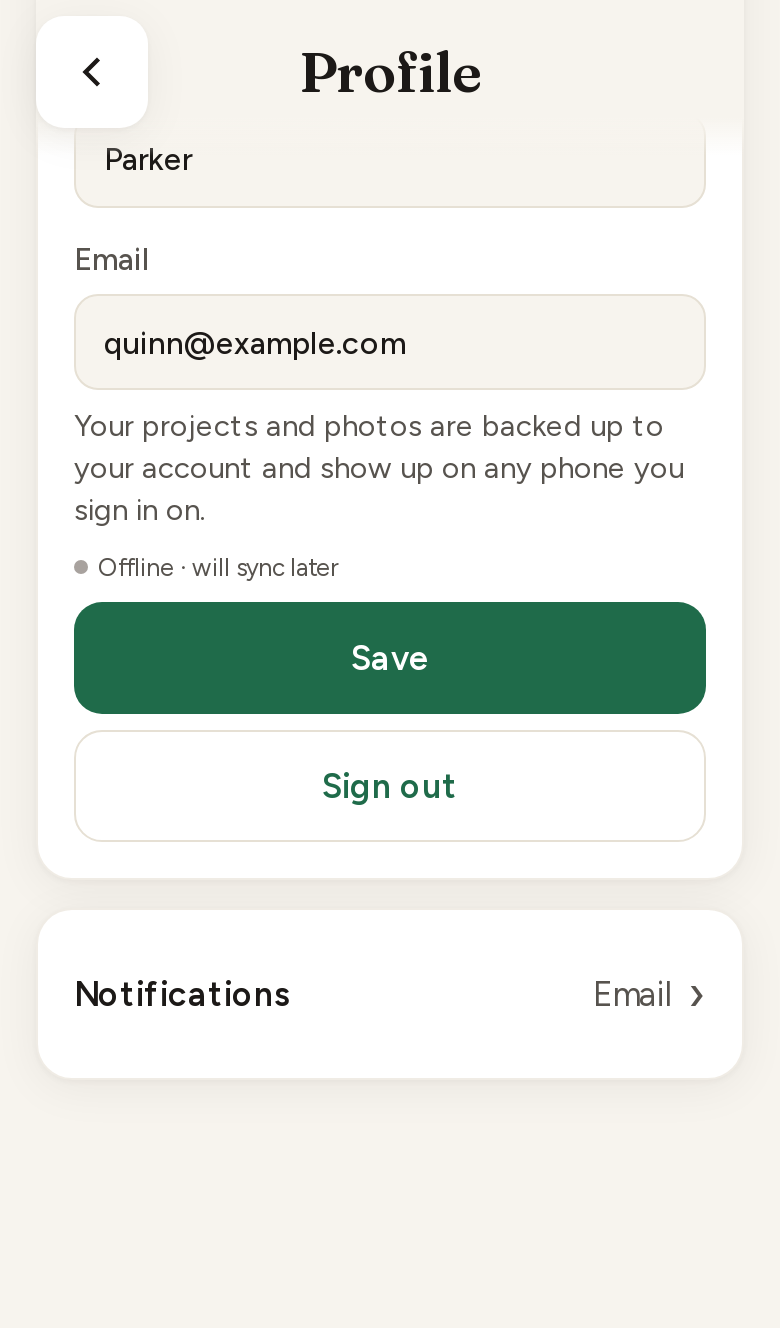
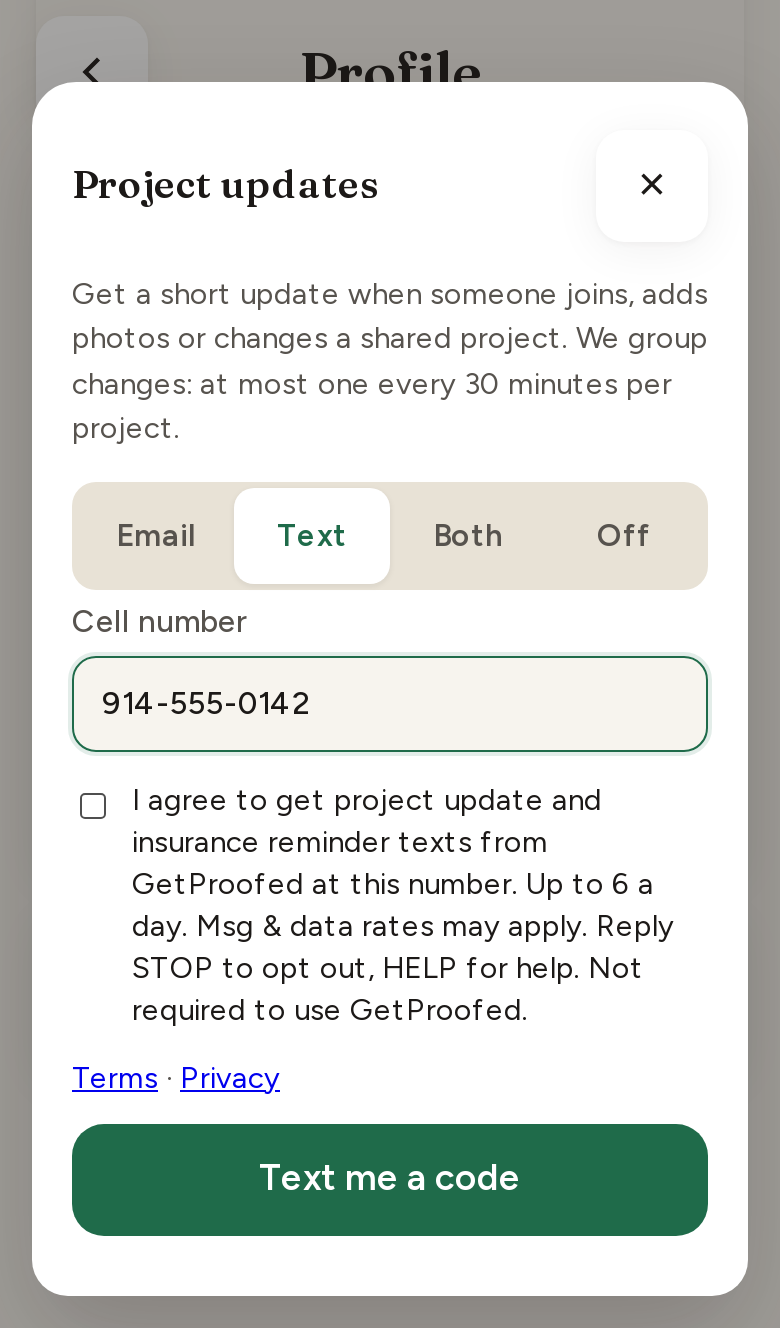
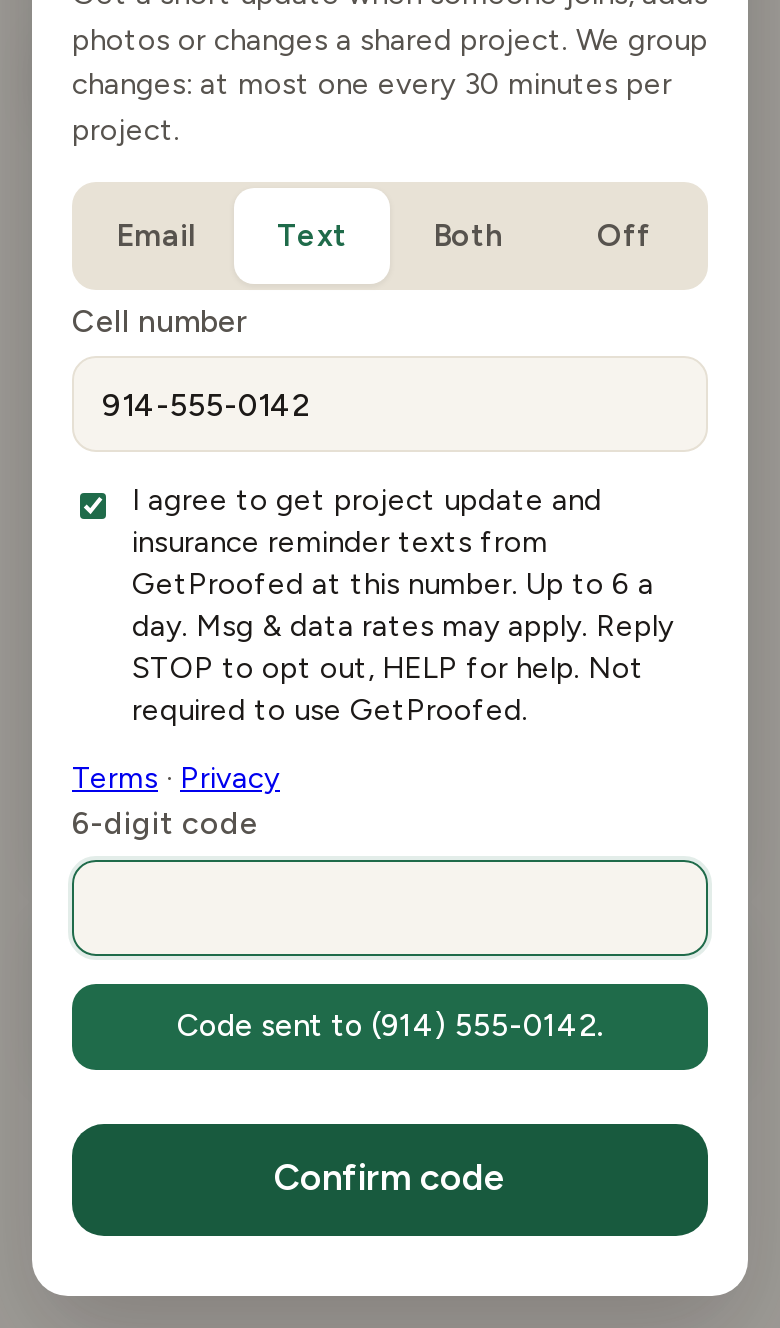
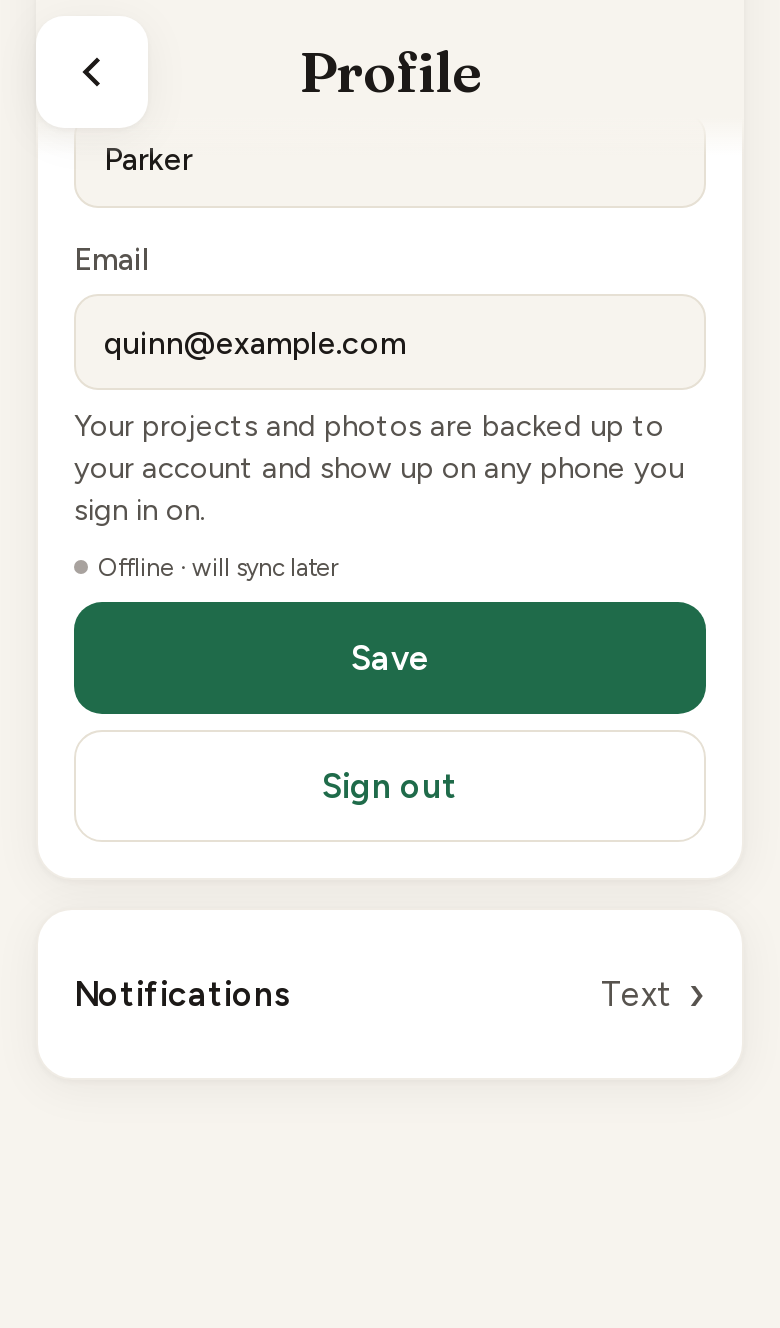
All four steps in one image: img/sms/sms-optin-flow.png. Screenshots are from the current GetProofed app (sample account; the 555 number is fictional).
2. What we send and how often
- Project update texts when someone else adds photos to or changes a project the user shares in GetProofed. Changes are grouped: at most one text every 30 minutes per project, up to 6 a day, and none between 9 PM and 8 AM in the user’s time zone. Example of the first update text (exact wording from the app; names vary; later updates omit the STOP reminder):
GetProofed: Alex added 3 photos to Oak St kitchen remodel. View: https://getproofed.ai/app Reply STOP to opt out. - One-time confirmation code when the user turns on texts or changes their number:
GetProofed: your code is 482913. It expires in 10 min. Reply STOP to opt out - One opt-in confirmation text right after the user confirms their number (quoted in section 1).
- Insurance (COI) reminder texts (same opt-in): a contractor gets a reminder 30 days and 7 days before the insurance certificate on file expires, on the expiry day, and once after it lapses; people on that contractor’s active projects get one heads-up if it lapses with no newer certificate. Same quiet hours; no more than 4 reminders per certificate. Example:
GetProofed: Your insurance (COI) expires Oct 6. Upload the new one: https://getproofed.ai/app#insurance Reply STOP to opt out. - One project invite text (see section 3):
Quinn Parker invited you to Oak St kitchen remodel on GetProofed. View free: https://getproofed.ai/i/Ab3xY7kQm Reply STOP to opt out
Message frequency varies with project activity. Message and data rates may apply. Spanish-language users get the same messages in Spanish (for example “Responde STOP para cancelar”). We never send marketing or promotional texts.
3. Project invites by text
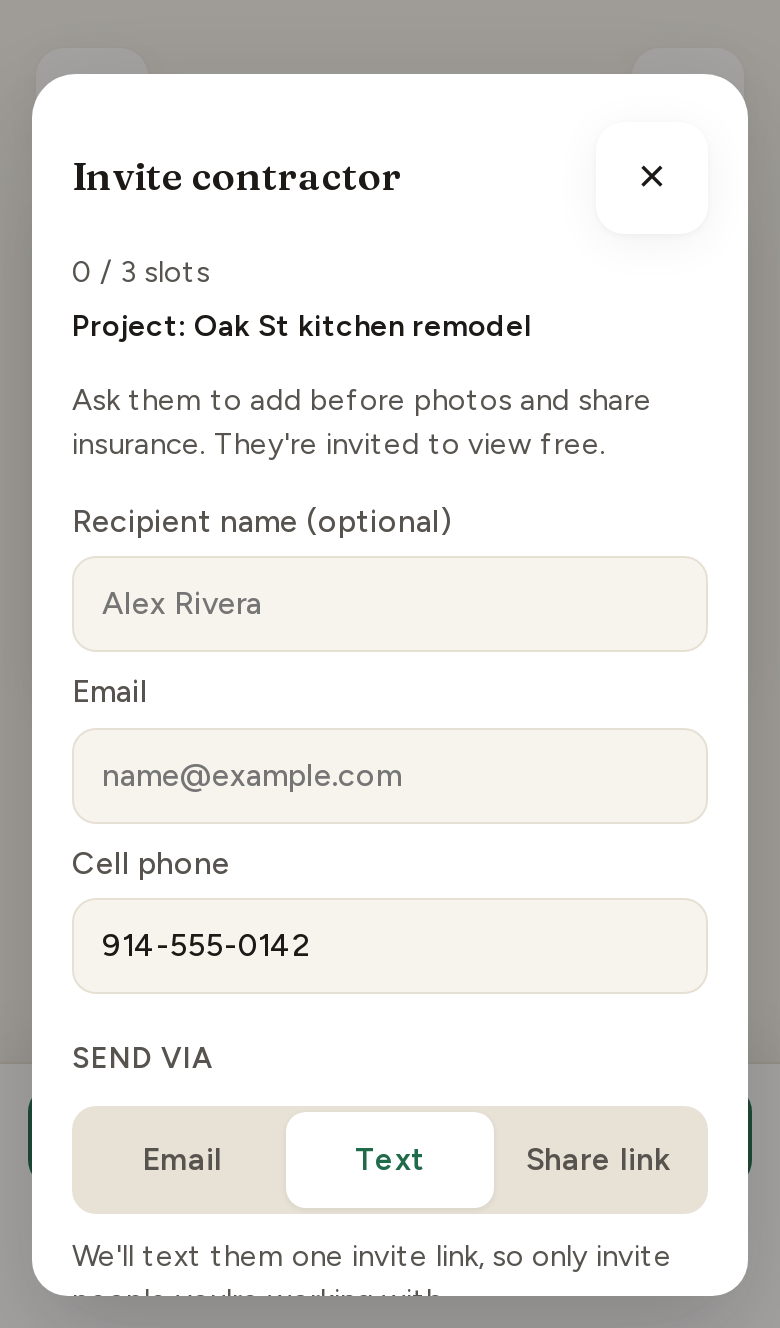
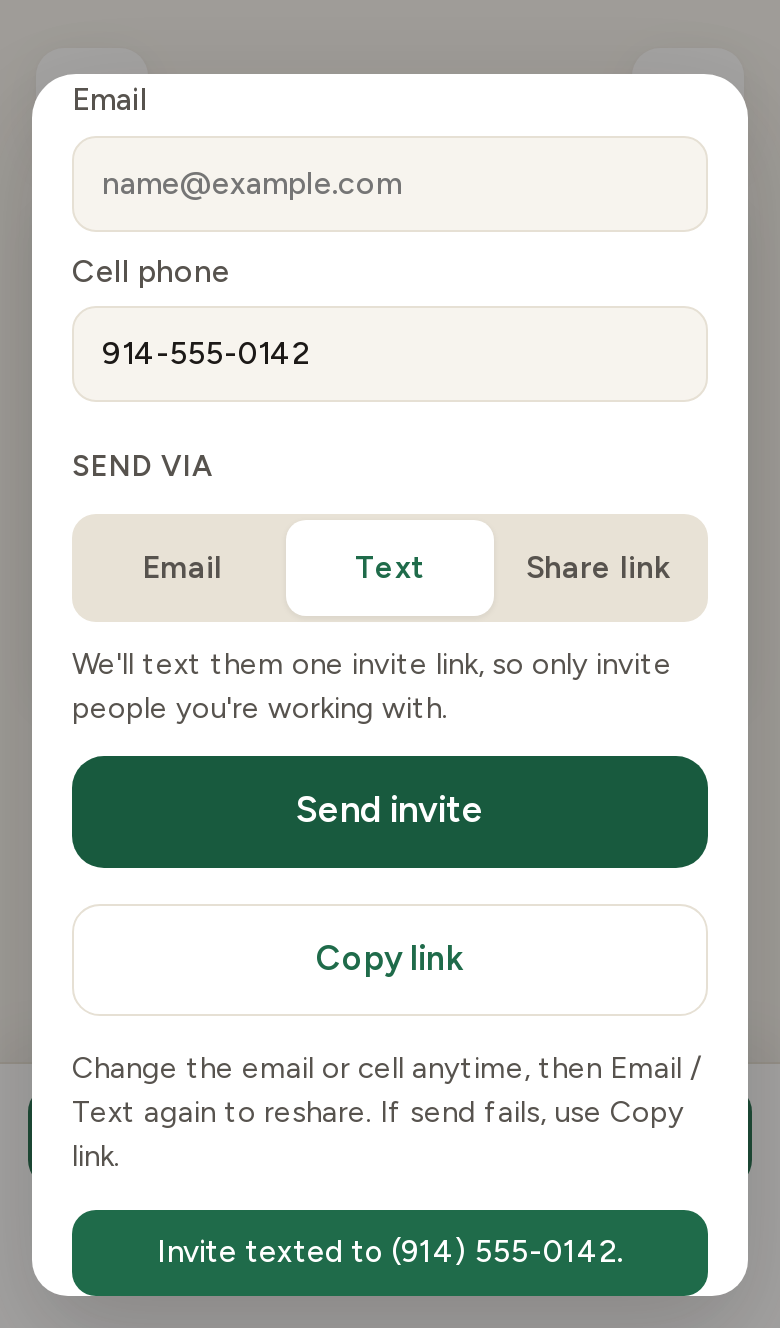
A signed-in homeowner or contractor can invite the other party on a project they are working on together (for example, a homeowner inviting their contractor) by entering that person’s cell number and tapping Send invite with Text selected. GetProofed then sends one text with a link to view the shared project for free. An invite does not sign the recipient up for recurring texts; they only get project update texts if they later create an account and opt in themselves as described in section 1.
- The text names the person who sent the invite and the project, and ends with “Reply STOP to opt out”.
- Numbers that replied STOP are never texted again, including by other users’ invites.
- Limits: 3 invite texts per phone number per day (from all senders combined), 20 per account per day, and 60 per IP address per day. US and Canada numbers only.
- When GetProofed will send the text, the invite sheet tells the sender, right above Send invite: “We’ll text them one invite link, so only invite people you’re working with.”
- Our Terms require users to enter only the number of someone they are working with on that project who expects to hear from them.
4. Stop, help and support
- STOP: reply STOP (or STOPALL, UNSUBSCRIBE, CANCEL, END, QUIT) to cancel. The number goes on our do-not-text list and gets no further GetProofed texts. Reply START to resubscribe.
- HELP: reply HELP for help. Our reply:
GetProofed project updates. Msg freq varies. Msg&data rates may apply. Reply STOP to opt out. Help: support@getproofed.ai - Users can also switch texts off anytime under Profile › Notifications, or email support@getproofed.ai.
- Wireless carriers are not liable for delayed or undelivered messages.
5. Privacy
We do not sell, rent or share mobile numbers or SMS opt-in data and consent with third parties or affiliates for marketing or promotional purposes. Text messaging originator opt-in data and consent are not shared with any third parties. Numbers are used only to send the messages described above through our SMS delivery provider. See our Privacy Notice and the text message section of our Terms.